A SaaS management platform helps you see what you're paying for, who uses each tool, and what you should keep, optimize, or cancel. Different platforms have different priorities — spend, access, contracts, or security — so the best choice often comes down to what you actually need. This guide explains what to evaluate against common scenarios, and how to avoid another incomplete dashboard.
A SaaS management platform (SMP) gives your organization a central view of the cloud applications it buys and uses. A capable platform brings together application inventory, spending, user access, actual usage, licenses, contracts, renewals, and ownership.
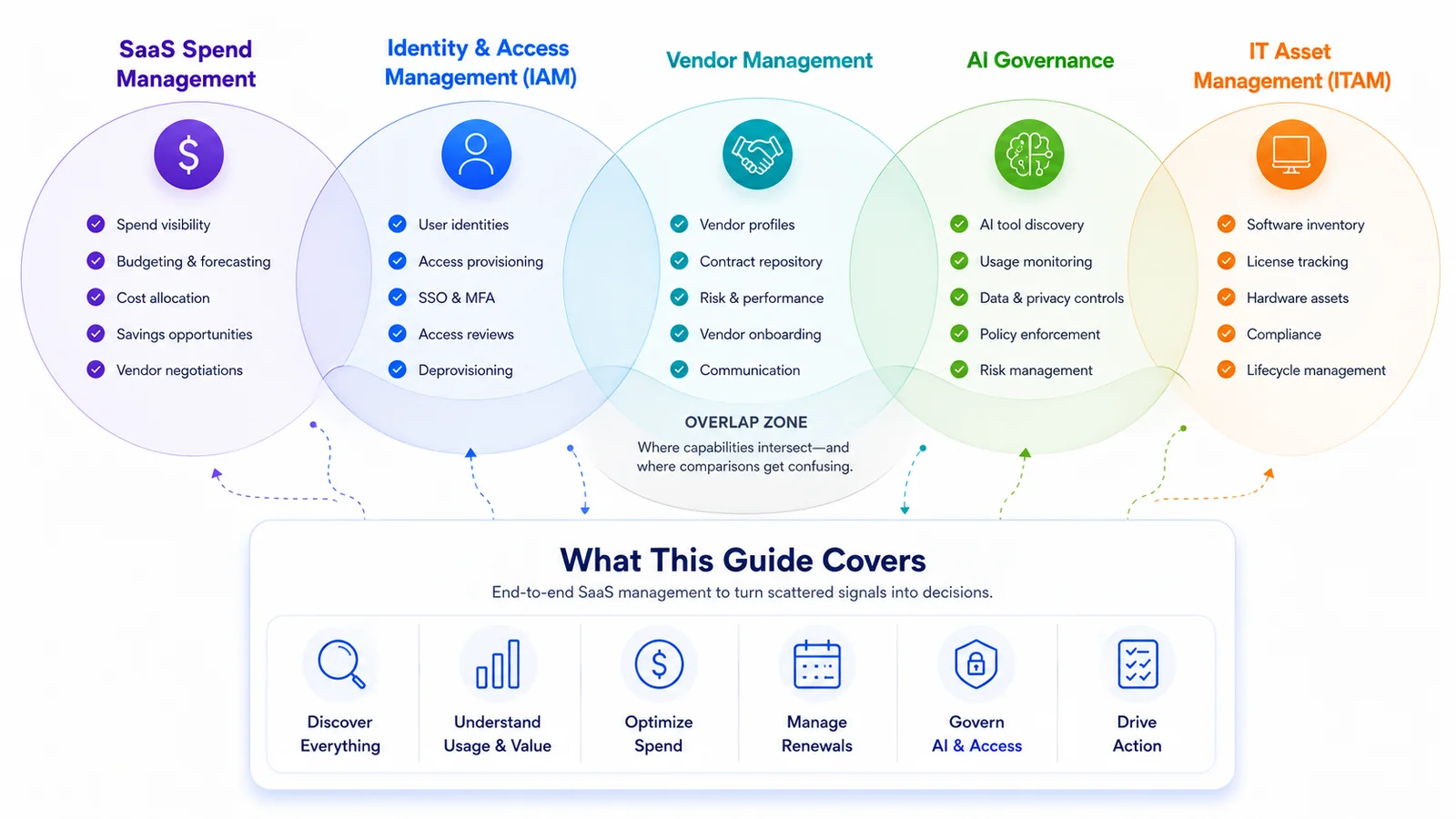
Unfortunately, this category now overlaps with SaaS spend management, identity and access management, vendor management, AI governance, and IT asset management — G2's SaaS management category themes reflect that breadth. The overlap is useful, but it also makes product comparisons confusing.
Let's compare six common scenarios that show where SaaS management breaks down, and what to assess in a platform for each one.
This is the most common starting point. Finance sees charges but not always the product behind them. IT sees sanctioned applications but not everything bought on a personal or departmental card. Procurement oversees signed contracts but not month-to-month tools. An identity provider might be able to access some logins but miss applications outside single sign-on.
Therefore, your number one priority should be to test whether a platform can reconcile scattered evidence into decision-ready control.
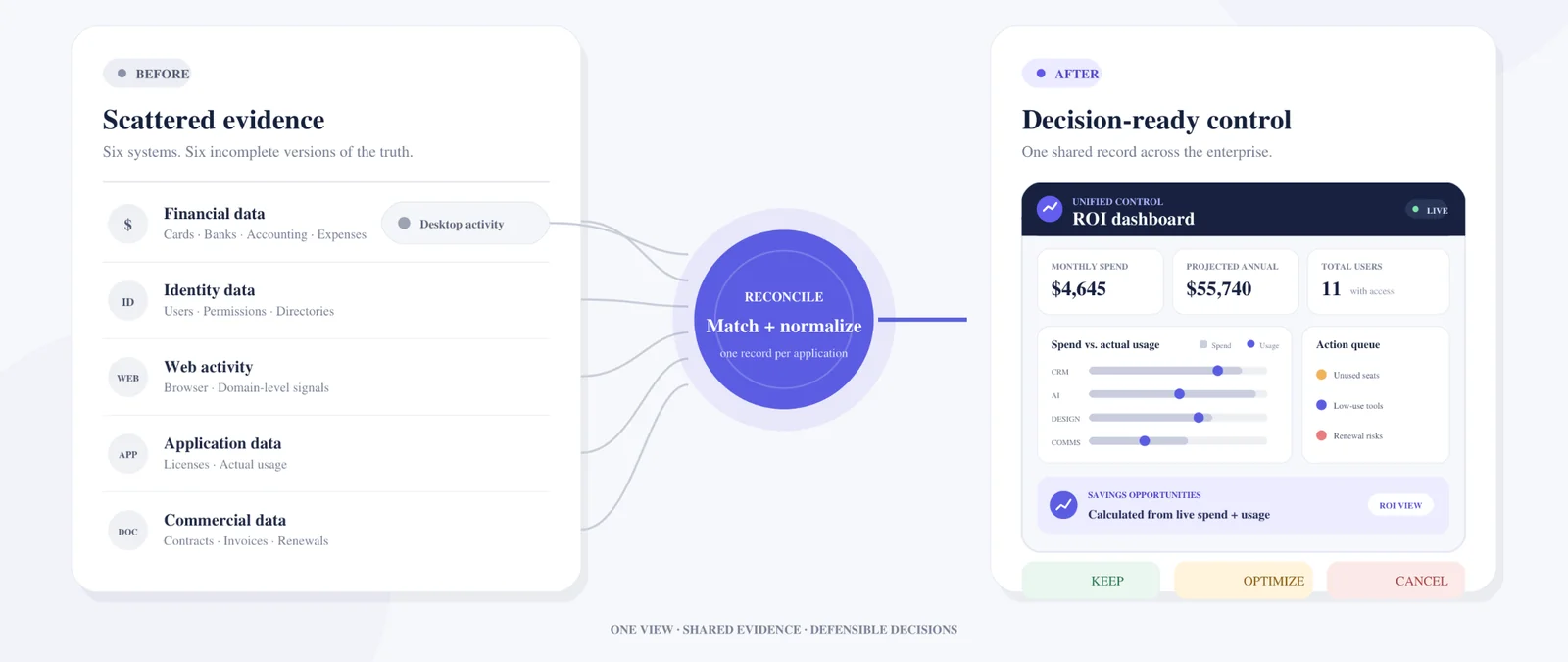
Look for a platform that can pull from:
Pro tip: during a pilot, give each vendor the same sample — several centrally purchased tools, a departmental card purchase, a personal expense, an application outside SSO, and a desktop-heavy product. Then compare what each platform finds without manual cleanup.
The most useful discovery metric to look out for is the percentage of known spend, users, and applications correctly matched to a named owner and a usable record.
Example platforms for this scenario: review Productiv, Nicklpass, and Nudge Security for app discovery and their ability to connect spend, users, contracts, and ownership.
The next question is whether the usage data is deep enough to support a financial or operational decision.
"Active" can mean almost anything. One login during the past 90 days marks a user as active even if the product is barely used — that is not enough evidence to renew a large agreement. Rather, look for usage at several levels:
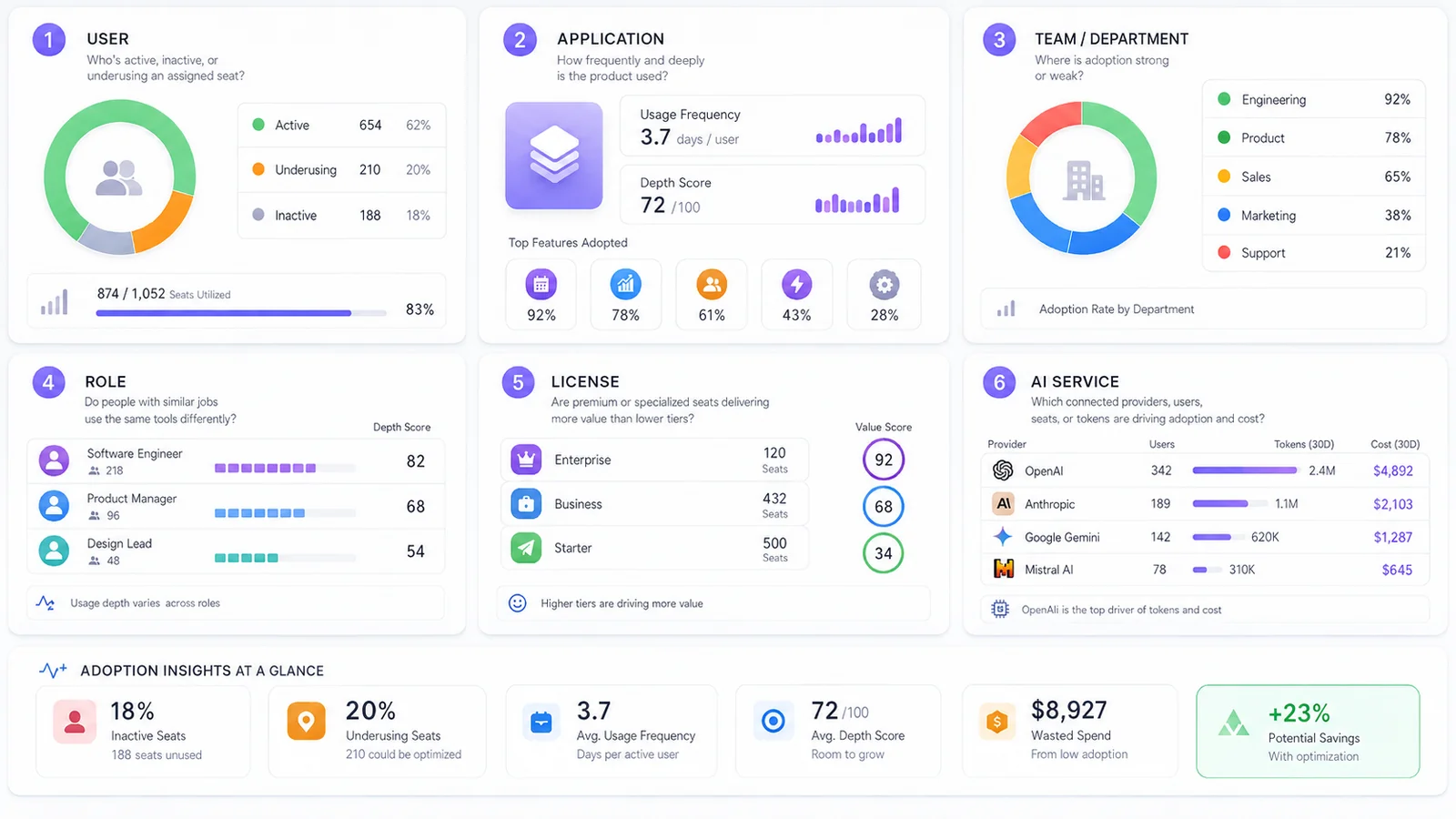
Pro tip: ask the vendor to explain exactly how it calculates "high," "medium," and "low" usage. Does the score use only a login, or does it consider sessions, active time, page views, connected API activity, or other meaningful events? Can an administrator inspect the underlying evidence?
Example platforms for this scenario: assess Zylo, Torii, and Nicklpass on usage depth, license utilization, and team adoption.
Many organizations already know that some seats are unused. The problem is that the evidence arrives too late, ownership is unclear, or cancellation requires work across finance, IT, procurement, and the vendor.
Start with three decisions for every application:
Pro tip: the platform should help move each decision into an action. Useful workflows include assigning an owner, opening a review, reclaiming or reassigning a seat, notifying a manager, recording a non-renewal decision, and preserving an audit trail.
Renewal management should begin well before a cancellation deadline. A calendar reminder without current usage, ownership, and spend context simply tells you that an uninformed decision is due. For every material subscription, require:
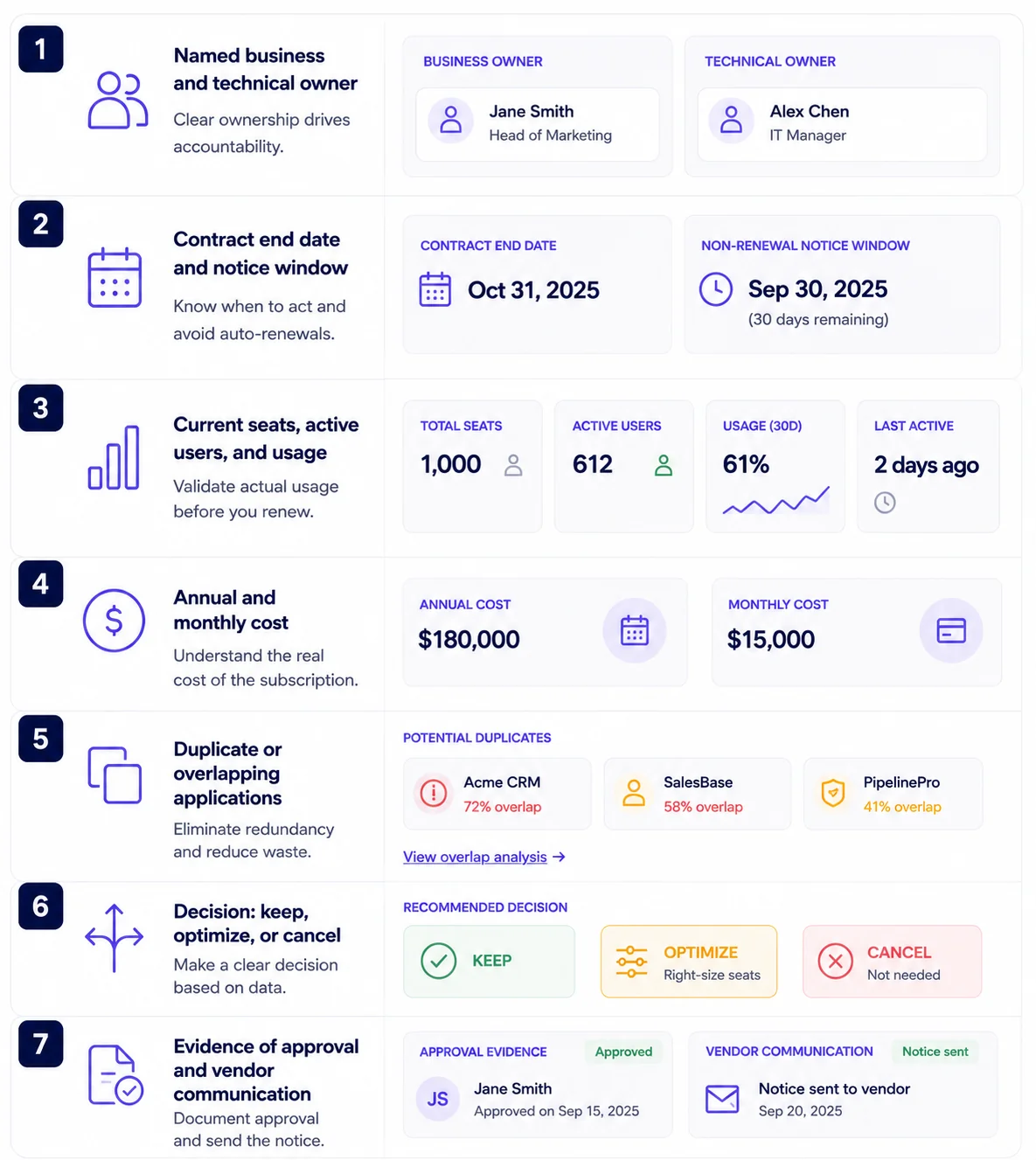
Build the workflow backward from the notice date. High-value agreements may need a 90-day review; smaller tools may need 30 days. The important point is to create enough time to validate demand, right-size seats, gather alternatives, and negotiate from actual usage.
Pro tip: be wary of a platform that presents projected savings as if they were realized savings. A recommendation becomes real only when seats are removed, a lower rate is signed, a tier is changed, or a renewal is stopped.
Example platforms for this scenario: look at BetterCloud and Nicklpass for renewal workflows, ownership tracking, usage visibility, and optimization decisions.
AI introduces familiar subscription problems and some new ones. The familiar problems are fragmented purchasing, overlapping tools, inactive seats, and weak cost attribution. The newer problems include token-based consumption, personal accounts, rapid tool adoption, and uncertainty about what company data employees may share. Separate the requirements into three layers:
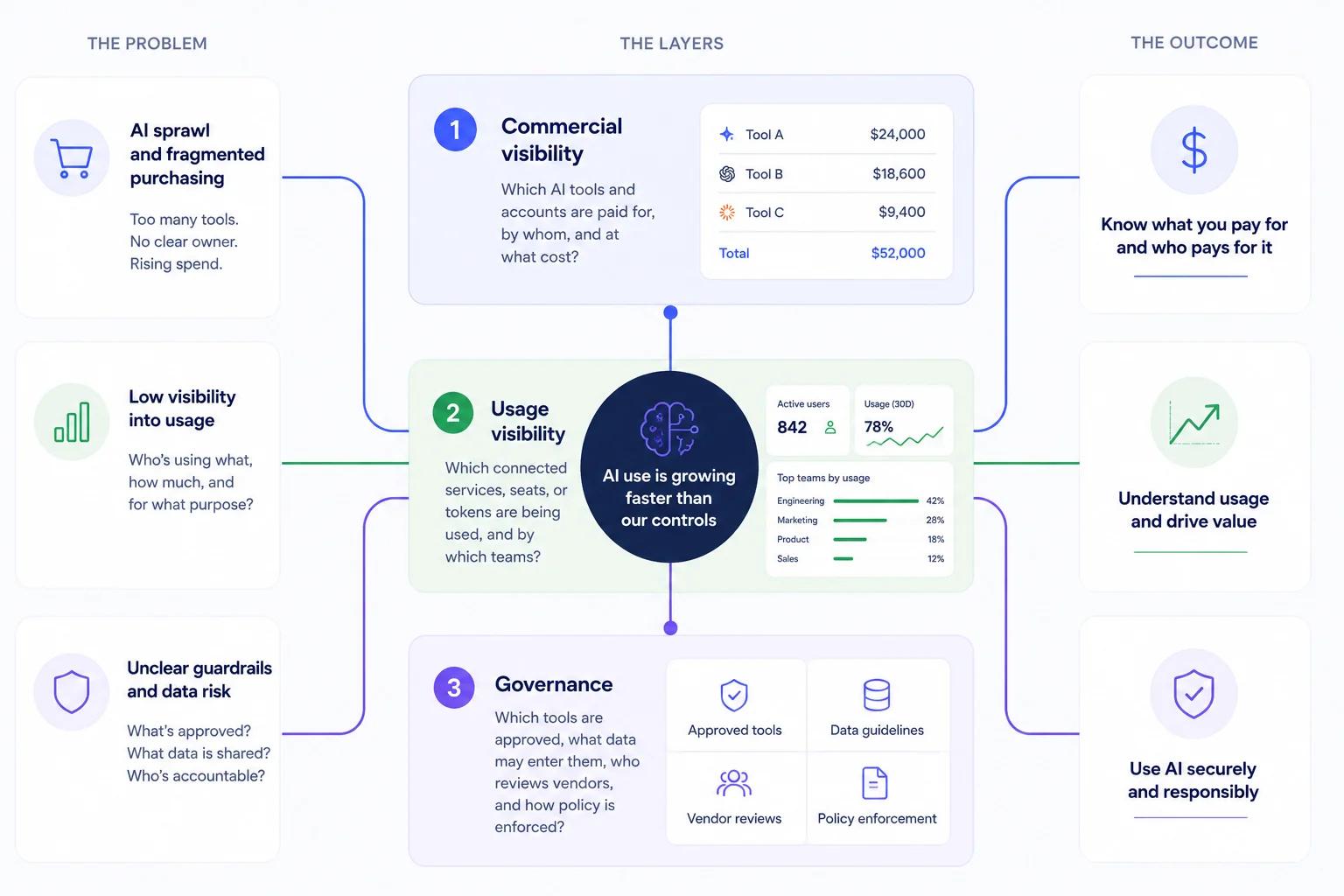
Pro tip: if a vendor says it provides "shadow AI detection," test the claim directly. Can it identify an unapproved application automatically, or can it only recognize a card charge, domain visit, or connected account after the fact? Can it detect data exposure, or merely the existence of usage?
Example platforms for this scenario: explore Torii and Nicklpass for AI tool visibility, user adoption, token usage, and governance.
The strongest platform must create a trusted shared record. Finance, IT, procurement, security, and business teams need the same source of truth for spend, ownership, usage, risk, and value. During evaluation, ask each stakeholder to answer one question from the same pilot data:
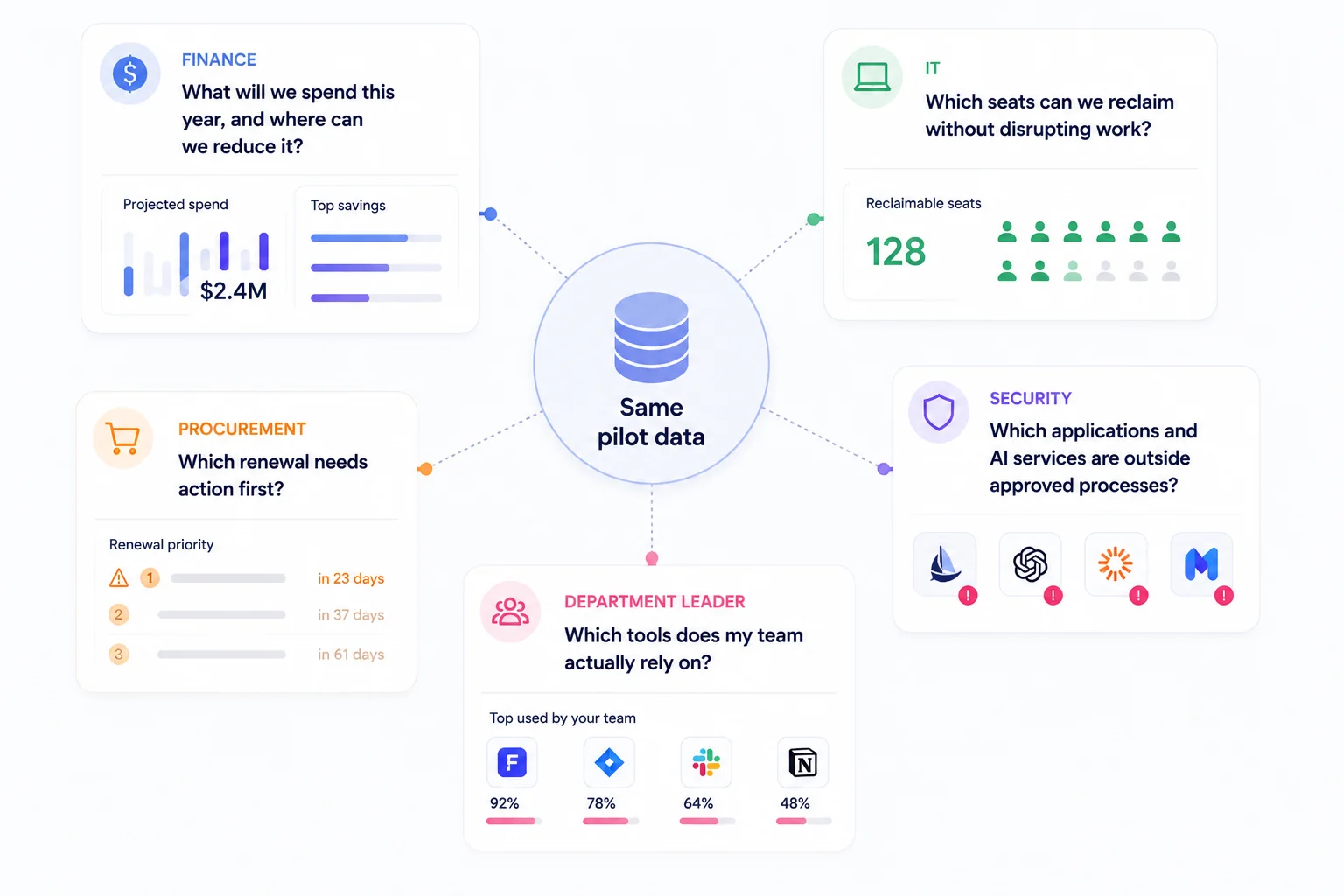
Pro tip: if the answers require separate exports and several days of reconciliation, the platform has centralized screens rather than an operating process.
Choose one outcome for the first 60 to 90 days — anything from establishing an inventory to finding unused seats, preparing for renewals, reconciling AI spend, improving offboarding, or reducing duplicate tools.
List your identity provider, accounting system, cards, expense process, contract repository, critical applications, browsers, desktop tools, and AI providers. Mark each source as required, useful, or out of scope.
Do not give vendors only clean enterprise applications. Include tools bought through different channels, inactive users, ambiguous merchant names, shared accounts, duplicate products, personal-card purchases, and a renewal approaching its notice date.
Select five applications with different usage patterns. Compare login status with sessions, activity, feature or token data, and department-level adoption where available.
Take a recommendation through approval and completion — reassign an unused seat, reduce a small contract, remove access for a former employee, or document a non-renewal.
Understand what browser components collect, whether page content or keystrokes are excluded, where data is stored, how administrators deploy the system, and how access to financial and employee-usage data is controlled. Also check audit logs, data retention, role-based permissions, directory support, implementation effort, and the status of relevant assurance reports. Evaluate current capabilities separately from beta, roadmap, or custom work.
Use your own data rather than a generic savings percentage. Estimate annual value from:
Then subtract platform fees, implementation, ongoing administration, and any managed-service costs.
SaaS management pricing is based on factors ranging from employees to managed applications, annual software spend, modules, or a negotiated enterprise contract. Compare the three-year total cost rather than the entry price, and include required modules, implementation, support, data connectors, managed optimization, and the internal labor needed to keep records accurate.
You can calculate your potential savings or learn to find, audit, and cancel unwanted SaaS and AI subscriptions here.
Connect your spend and your workspace, and see the gap between what you pay for and what gets used.
